


New Version of Diddlebug Released
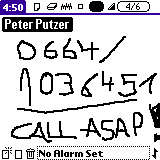 One of the best Palm OS freeware apps just recently received its first update in nearly four years. Work on the open source Diddlebug program has picked up after a long hiatus and the new developers have just released a new version. Diddlebug is essentially an e-post it note application. It allows you to scribble notes on your Palm device using the stylus (or finger) and set alarms and reminders for each note with ease. The new version features numerous bug-fixes, proper 5-way navigation support and compatibility with the latest Palm devices including the Treo 600/650/680 and Centro devices.
DiddleBug v.2.90.d.5 is free to use and is open sourced under the GNU General Public License.
 Permalink
 Print
PrintArticle Comments
(25 comments)
The following comments are owned by whoever posted them. PalmInfocenter is not responsible for them in any way.
Please Login or register here to add your comments.


RE: Absolutely, positively LOVE it!

Maybe some talented person can improve the GUI just a bit, but glad to see it installed back on my Palm again...
|
**Another vote for a >100MB RAM Treo**

Still exists?
Maybe I'll try it again. Never know, they may have actually *added color*!Or even Hi-res!
Seriously, this is a nice app. But its way old, and doesn't look like they fixed that yet.
http://tinyurl.com/2ooncg
RE: Still exists?
Now, what would be nice is to see this app use 256 grayscales on hi-rez to smooth the graphics out, making handwriting near perfect. Also allowing gray scale fills and color choices would be amazing.
Pat Horne
RE: Still exists?
RE: Still exists?
Pat Horne
RE: Still exists?
http://www.lintlabs.com/no2.html
RE: Still exists?
Pat Horne
RE: Still exists?
Would you like to jot down notes on your iPhone's gorgeous touch screen? Are you missing a way to sketch a simple diagram as a quick reminder? Will your children like to draw on your iPhone, maybe on top of a picture you shoot with the camera? Sketches is a native iPhone application that will allow you to do all that.
Jot down your notes, scribble your thoughts and annotate your pictures using only your fingers and your imagination! Illustrate your ideas with simple but colorful diagrams, notes and sketches.
Place shapes using multitouch gestures, zoom in for those accurate little details, save your creations in your personal corkboard or send them to others. Use Sketches for business, creativity or simply share it as a pastime with your friends.
Which files to load?
After unzipping download would I just need to install "DiddleBug-english.prc" on my Centro?
RE: Which files to load?
RE: Which files to load?
thanks
RE: Which files to load?
RE: Which files to load?
Wow, leave it to Palm to take away features.
Don't they still take notes in middle school?
The last known classic PDA user.
I've recently upgraded from a Palm TX to a Newton MP2000!
RE: Which files to load?
Pilot 1000->Pilot 5000->PalmPilot Pro->IIIe->Vx->m505->T|T->T|T2->T|C->T|T3->T|T5->Zodiac 2->TX->Verizon Treo 700P->Verizon Treo 755p
RE: Which files to load?
RE: Which files to load?
I feel bad for all the newbs that buy a Palm and never realize they can get killer apps like this for free.
Pat Horne
RE: Which files to load?
Let this be a warning and deterrent to anyone else thinking of trying to upgrade your Palm devices to 2001-level technology, especially by using anything Palm used to be competent at. The future of Palm is Windows Mobile - you WILL be assimilated.
PalmOS is only to be used on the Fisher-Price Centro line, then they can write it off as "not selling" because they are not selling it.
|
**Another vote for a >100MB RAM Treo**
Liked Diddlebug way back when
RE: Liked Diddlebug way back when
|
**Another vote for a >100MB RAM Treo**
v. 2.90.d.5???
RE: v. 2.90.d.5???
The last known classic PDA user.
I've recently upgraded from a Palm TX to a Newton MP2000!
no need for this app
it's faster just to type in the note with the centro/treo keyboard rather than to pull out stylus, tap, scribble, replace stylus with this klunky etch-a-sketch.
RE: no need for this app


Latest Comments
- I got one -Tuckermaclain
- RE: Don't we have this already? -Tuckermaclain
- RE: Palm brand will return in 2018, with devices built by TCL -richf
- RE: Palm brand will return in 2018, with devices built by TCL -dmitrygr
- Palm phone on HDblog -palmato
- Palm PVG100 -hgoldner
- RE: Like Deja Vu -PacManFoo
- Like Deja Vu -T_W


Absolutely, positively LOVE it!
Easy notes - awesome
Quick note alarms - excellent
Fast, stable, & small footprint - The "zen" of a company I once knew
Free - Priceless
One thing you should try is making Diddlebug movies! I have made 10-15 funny scrolling movies like the ones you made as kids when flipping book pages. My kids were engrossed with my T3 a few years back and nearly consumed a 12 hour drive on vacation.
... now time to go DL the upgrade! Thanks to everyone who worked on this.
Pat Horne