


|
Contact Info: Kyocera URL: www.kyocera.com Verizon URL: www.Verizon.com PalmInfoCenter.com Bottom Line: The Price:
The Cons:
PalmInfoCenter.com Ratings*:
*Maximum Rating is FIVE (5) InfoPalms |
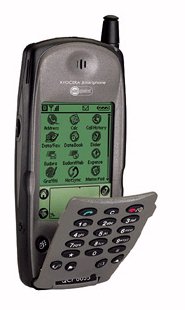
Kyocera QCP 6035 Smartphone By a Guest Reviewer 3/16/2001 I picked up one of the Kyocera 6035 Smartphones last Tuesday at my local Verizon store and I love it. The integration and synergy of the phone, Palm, and modem is the key advantage. Technology is supposed to make our lives better and simpler. Having one device is definitely better.
Speakerphone is loud and clear. It also has a voice memo feature. This is great for adding to your ToDo list when manual entry is not convenient.
Software
I performed a hard reset of the device at which point it loaded the PalmOS 3.5.1, the smartphone apps, and returned the default Verizon settings to the device. The 6035 isn't perfect. There is no USB cable for the cradle. Arrrrgggh! The stylus sits in the cradle pointing away from you. Not very intuitive. The stylus is nice and long but too light for my tastes. I had a stylus/pen combo on my Palm Vx. I wish a similar replacement was available for the 6035. The IR beaming area on the top of the smartphone is also the backlight and sleep button. This was a great design decision and contributes to the device's simplicity.
Wireless Access Quite frankly I was so stunned/happy when the sales rep told me unlimited Internet access came with the phone that I didn't ask many questions. The sales rep said I could make unlimited data calls and that it would not deduct from my calling plan minutes. They also gave me a POP3 email account @airbridge.net. The phone does place a call via the built-in wireless modem and connects to Verizon's network via PPP. You can not receive voice calls while online but you are alerted of new voicemail and text messages. The phone is tri-mode: digital cellular, digital PCS and analog. The wireless modem uses CDMA not CDPD which is what Novatel uses for their wireless modems(I believe). I am particularly enjoying being on AOL Instant Messenger while on the train ride home. I am getting consistent 14.4K connections. I use the Internet access while I'm on the train to and from Manhattan. The reception may be slightly better than other phones I've used but it is definitely not any worse. Still too soon to tell for sure.
Desktop Application I was able to sync my Vx and then transfer my data to the smartphone via a second sync without any difficulty. I used a Keyspan USB adapter to connect the cradle to my PowerBook. I haven't tried a IR sync which I would do frequently with my Palm Vx when traveling.
Conclusion |


 Permalink
 Print
PrintArticle Comments
(141 comments)
The following comments are owned by whoever posted them. PalmInfocenter is not responsible for them in any way.
Please Login or register here to add your comments.
 Comments Closed
This article is no longer accepting new comments.


RE: Big, lousy design
Have you seen the picture of a VisorPhone on an Edge? That looks lousy.
The numeric pad is for entering numbers manualy. ;-)
{Sign up now for the George Dubya skool of Internet commentary. Use of punctuation, and spelling-wise, optional.}
RE: Big, lousy design
The Visor Deluxe is 4.8" x 3.0" x 0.7" and weighs 5.4 oz before you attach the VisorPhone to it. I can't make an exact measurement but the Visor phone sticks about an inch out of the top of the Visor and adds about a half inch to the depth. The VisorPhone weighs 2.9 oz so together they weight 8.3 oz. The Visor Deluxe costs $200 and the VisorPhone $300.
The 6035 is 5.59" x 2.60" x 0.86" and weighs 7.35 ounces. So it seems to me the 6035 is about the same height, thinner, less deep, weighs less, and costs the same as the Visor Deluxe/VisorPhone combo.
Also, I like the keypad. I never touch the screen of my Palm with my finger; there's too much risk of the screen getting scratched and oily fingerprints are a given.
---
Plenipotentiary
Palm Infocenter
RE: Big, lousy design
RE: Big, lousy design
The Kyocera smart phone fits right in. This time, they got it right.
RE: Big, lousy design
- Du
RE: Big, lousy design
RE: Big, lousy design
RE: Big, lousy design
RE: Big, lousy design
The current VisorPhone only does GSM 1900, which is useless outside the US.
Handspring has said they would have a dual-band or tri-band VisorPhone later this year which would be able to road internationally (other countries use GSM on 900 and 1800 MHz bands)
---------
In North America GSM is only good in some large cities. If you travel at all you need analog access and Handspring does not offer it so as far as I am concerned it's useless.
RE: Big, lousy design
RE: Big, lousy design
"The prototype we looked at did have some issues that need to be worked out. We found the display to be dull and washed out, so it didn't show colors as well as you would expect. The display also showed dark vertical bands, which can be reduced by adjusting the brightness. Even at maximum brightness, the bands were visible, but not as pronounced. We also noticed that the stylus sleeve didn't hold the stylus very well. We lost the stylus within minutes of receiving the phone because it was too loose. Again, we expect Samsung will address these problems in production units."
Hmmm... I wonder if I should return my Kyocera... nah!!!
Another reason why I chose the Kyocera over the Samsung was because if I'm in a dark alley or something and I need to answer the phone, I'd rather use a Kyocera because it looks like a regular phone when the lid is closed,... whereas the Samsung's revealing, backlit Palm screen says "steal me" all over it... (I live in LA)
Sad but true: it's the type of world we live in.
RE: Big, lousy design
I have had both the Samsung and the kyo and for me the choice is simple. The Samsung simply misses the mark. And the voice dial is not an error free solution.
Peace,
RE: Big, lousy design
With this phone, I put it on the speakerphone mode, and hold it in my left hand, and do the stylus with my right hand. My neck and shoulder are much more relaxed than they used to be.
A few quick questions for the reviewer...
Just a few questions :-)
Is the backlight the "old style" like the sony clie is (background is lit rather than the text)?
Have you tried syncing it with the Palm Mac desktop software instead of using Virtual PC?
Thanks,
George
RE: Yes, I used the Mac version of PalmDesktop
It worked without any problems at all.
I don't remember how the Clie backlighting looks but as I said it seems to be the hardware equivalent of the m105.
RE: A few quick questions for the reviewer...
Great news on the Mac desktop software...
When you turn the backlight on, do the letters on the screen glow, or does the background glow leaving the letters black?
Thanks,
George
RE: A few quick questions for the reviewer...
RE: A few quick questions for the reviewer...
RE: A few quick questions for the reviewer...
More questions
Speaking of internet access, how long does it take to connect?
Thanks for the review.
Scott
RE: More questions
btw. It takes me about 10/15 seconds to establish a connection
RE: More questions
RE: More questions
RE: More questions
RE: More questions
Scott
Responses to several issues
The Mobile IP service is CDPD (i.e. just like OmniSky), for a flat rate. Unfortunately, this isn't the data service used by the SmartPhone. As far as I can tell, the SmartPhone establishes a PPP-like connection to Verizon as an ISP. I don't know that it's PPP, specifically, but you very clearly establish a data connection which persists (and you can't receive or make voice calls) until you disconnect. This is very different from the CDPD connections OmniSky uses, which appear to disconnect and reconnect for each web hit (which is slower, but frees up the connection for some other user, I'd guess). You get charged for all of the time during which you have a connection. This is a bit dangerous, since it's not all that obvious that you have a data connection. You can establish a data connection, then switch to a Palm app, for example, and still get charged for being connected until you either remember to disconnect or the connection times out. You can set Eudora (the mail client) to automatically disconnect when done, which helps.
The Verizon salesperson I worked with was amazingly knowledgeable about the Smartphone. I suspect that it was because the store was in Wall Street, but she even knew a lot of interesting history about the deal between Qualcomm and Kyocera that produced the phone.
As for how the device acts when the flip is up or down, it's actually pretty cool. The phone has two modes that you switch between.
1) When the flip is up the device acts like a phone. You use rubber buttons to dial, and only the upper half of the display is visible, and you don't use the touch screen. You basically interact with it like a cell phone -- select menu items with the wheel, enter letters by pressing digits repeatedly, send and hang up buttons, and so on. There are four buttons on the bottom of the flip that coorespond to the regular palm buttons (in fact, they are rubber buttons that just stick through and press the Palm buttons) that are: find, silence, messages, and speakerphone.
2) When the flip is down, it's a Palm with some phone integration (e.g. tap a phone number in the address book to dial it).
RE: More questions
Great Phone, love the web-clipping apps!
RE: More questions
pqa's on the Smartphone
Have you loaded any Palm VII pqa web clipping apps yet and tried them? So far, I have not been able to get them to connect - always get a "serial" error...
Thanks
I have successfully used the following...
E*TRADE
MapQuest
BigCharts
Yahoo Mail
RE: pqa's on the Smartphone
RE: pqa's on the Smartphone
RE: pqa's on the Smartphone
Every PQA I have installed has worked. No special setup was required ... the verizon comes pre-setup
with the internet settings.
David
Internet is not free forever...
The site also gives the following disclaimer:
"The $25 service credit promotional offer is not available in the following states: ME, VT, NH, MA, RI, CT, NY and the following area codes in NJ (201, 973, 908 and 732).
Kyocera QCP 6035: Not Accurate Info. in Review
1) Verizon only gives 1 month free access until April 1, then they charge $6.95/month for monthly service!
2) I was also told that any calls made (even data calls) are considered a phone call and deduct minutes from your wireless plan. Unlimited brousing is a not available yet, unless you have unlimited wireless minutes!
DrB
RE: Kyocera QCP 6035: Not Accurate Info. in Review
RE: Kyocera QCP 6035: Not Accurate Info. in Review
RE: Kyocera QCP 6035: Not Accurate Info. in Review
The default browser on the Kyocera Smartphone only allows text browsing. but you can install
a graphics browser if you'd like. That is the cool part about the phone you can install pretty much
any Palm software and it works ... I have installed over 70 palm apps!
David
RE: Kyocera QCP 6035: Not Accurate Info. in Review
With the Verizon service they maintain a simple backbone connection to the 'net

 Only the first 50 comments are displayed within the article.
Click here for the full story discussion page...


Latest Comments
- I got one -Tuckermaclain
- RE: Don't we have this already? -Tuckermaclain
- RE: Palm brand will return in 2018, with devices built by TCL -richf
- RE: Palm brand will return in 2018, with devices built by TCL -dmitrygr
- Palm phone on HDblog -palmato
- Palm PVG100 -hgoldner
- RE: Like Deja Vu -PacManFoo
- Like Deja Vu -T_W


Big, lousy design