


Howto: Replace Graffiti 2 with Original Graffiti
Many users have expressed frustration with PalmSource's move away form the Original Graffiti input system they have used and been accustomed to for many years. A simple method to replace Graffiti 2 has been discovered. Read on for a full step by step tutorial.
Back in January, PalmSource announced a licensing agreement for CIC's Jot handwriting recognition software for the next generation of data input for the Palm OS. PalmSource has committed to Graffiti 2 as the next generation input method for the Palm OS.
To the delight of many long time users, original Graffiti can be restored in a few simple steps. Resident Hong Kong Palm OS enthusiast, Brando, recently posted the basic instructions on his website. You will need access to a Palm Tungsten T or Sony Clie with Palm OS 5.0 to get the necessary files for the procedure. Palm OS 5.4 compatible files are listed below.
Step 1
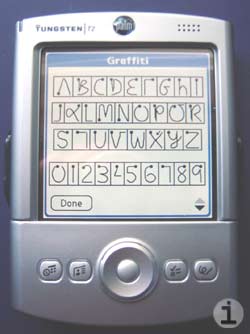 Use a handheld that has the original Graffiti system installed ,
Use a handheld file manager, such as FileZ, to locate the following files (You will need to check the ROM box, as the files are stored in the device ROM):
Use a handheld that has the original Graffiti system installed ,
Use a handheld file manager, such as FileZ, to locate the following files (You will need to check the ROM box, as the files are stored in the device ROM):
Graffiti Library.prc, size: 30k, creator: grft
Graffiti Library_enUS.prc, size 22k, creator: grft
Step 2
Beam or copy the above 2 files to the target handheld you want to install original Graffiti on.
Step 3
Preform a soft reset (simply press the devices reset pin), and you're set to start enjoying original Graffiti again.
PalmInfocenter tested this procedure with a Tungsten T and were able to successfully install Graffiti over Graffiti 2 on a Tungsten T2, Zire 71, Tungsten C and a Sony Clie NX80V. Other models that run Palm OS 5.0 should also be compatible. Even after the replacement the write anywhere on screen feature of Palm OS 5.2 still function as normal, even on the Tungsten C. The on-screen Graffiti reference also reverts back to the original guide.
Restore Graffiti 2
if for any reason you want to restore Graffiti 2, you must preform a hard reset. A Hard reset it preformed by holding the power button down during a reset. This will restore the handheld to it's original factory state, and will wipe out all of your installed programs and data, so make sure you have a recent backup on hand.
update:
Ben Combee sent in this tip that will allow you to revert back to Graffiti 2 without a hard reset.
Step 1
In Filez, go to the Details form for each database. Change both the
name and creator code of each one.
Step 2
Soft reset your device.
Step 3
In Filez, delete the two databases, then soft reset.
update 10/2003:
This howto does not work with the Sony Clie UX50. It does work with the T3.
update 5/2005:
Files for Palm OS 5.4 devices including the Tungsten T5, TE 2, Z22 and Palm TX are available here.
This tutorial is provided for informational purposes only, use at your own risk.
 Permalink
 Print
PrintArticle Comments
(198 comments)
The following comments are owned by whoever posted them. PalmInfocenter is not responsible for them in any way.
Please Login or register here to add your comments.
 Comments Closed
This article is no longer accepting new comments.


RE: Hmm...
Thanks.
In the Spirit of Umoja,
Ronin
Warez Infocenter?
RE: Hmm...
elo
RE: Hmm...
RE: Hmm...
Of course, the OP was about the legality of this article; I was merely responding with information that might be helpful to some. If you aren't interested, why respond?
elo
RE: Hmm...
Further, are you certain there is any inpropriety in my copying these files from an OS5 device I own, to an OS5.2 device I own?
RE: Hmm...
Palm III --> Compaq Areo 1550 --> Palm IIIc --> Visor Edge --> Casio EM500 --> Sony T415 --> Compaq 3670 --> Dell Axim x5 Advanced --> Sony SJ20 --> Palm T|E
Too Easy?
I'm starting to actually like G2, so I think I will leave well enough alone.
RE: Too Easy?
It shows good systems engineer on the PalmSource side. Pretty much, they just updated the handwriting rec. engine and kept the PRC names the same. Having the contention of PRCs of the same name in RAM and ROM resolve to where the OS runs only the RAM resident PRC goes all the way back to Palm OS 2.0.
However, since the Genie is out of the bottle with this now, who knows if Xerox legal will complain that it is too easy for the end user infringement. That is a massive gray zone.
But frankly, I'm glad this is so "drop in" so I can make a "T" the way I used to with the old stuff. :)
Where can I get those files?
Anyone know where I can find these 2 files online so I can just hotsync them to the T2?
RE: Where can I get those files?
http://www.tpug.org/SK-/Graffiti1.zip
I downloaded the file and virus-checked with Norton; it's OK.
If you want to follow the original thread, go here:
http://www.spug.net/forums/showthread.php?s=&threadid=45510
The Graffiti1.zip link is on page 2 of the thread.
RE: Where can I get those files?
Can we use Graffiti 2 on Tungsten T?
Can you send TT2 Graffiti2 PRCs?
Regards..
RE: Where can I get those files?
RE: Where can I get those files?
RE: Where can I get those files?
For G2 you need the following files:
Graffiti 2 Library, size 95K, creator grft
Graffiti 2 Library_enUS, size 131K, creator grft
For write anywhere you need:
GoLCD, size 7K, creator GAny
GoLCD-GAny, size 8K, creator GAny
GoLCD-GAny_enUS, size 2K, creator GAny
This worked for me, your mileage may vary.
RE: Where can I get those files?
GoLCDLib
Graffiti 2 Prefs
Graffiti 2 Prefs_enUS
You can also copy the new Prefs application. Hurrah! :-)
RE: Where can I get those files?
Please drop me a note (preferable by eMail.)
Thanks
icarus
presently using T|T - waiting for 320x480 VG Design with Bluetooth (No clam-shell, no keyboard, no slider, etc.)
RE: Where can I get those files?
Hmmm Question...
If you copy these files and the Graffiti 1 libs, can you get G1 with write anywhere? Has anyone tired this?
- Tere
>For write anywhere you need:
>
>GoLCD, size 7K, creator GAny
>GoLCD-GAny, size 8K, creator GAny
>GoLCD-GAny_enUS, size 2K, creator GAny
>
>This worked for me, your mileage may vary.
- Tere
RE: Where can I get those files?
I want to try Graffiti2 on my TT. Please send me (belek@flashmail.com) or share it any web site.
Thanks.
RE: Where can I get those files?
RE: Where can I get those files?
Could someone please send those libs to cannedbart(at)pacbell.net
Peace,
-Bartman007
Has PIC now turned into a warez group?
Unless PIC supports trading stolen programs, these posts (and arguably this article) should be removed. If you feel it is ok to trade these, files you might as well start hosting PW-Patcher and the Palmpass updates. But no doubt you can find a way to rationalize stealing Palm system files...
Give me a break
Peace Out
Alan
RE: Where can I get those files?
What is the difference between stealing an unlicensed Graffiti application (which Palm no longer will be using do to legal concerns) and stealing an unlicensed application from a company other than Palm? Please enlighten us all, Grasshopper. No doubt one of your law school professors can help you out on this one if you don't know where to start.
RE: Where can I get those files?
RE: Where can I get those files?
I cannot tolerate Graffiti 2. I attempted the switch using a SD card and all seemed to be fine except I could not get capitalization. Any help out there for a Tungsten E user? Palm of course says that it can't be done. Help!
RE: Where can I get those files?
I am also a tungsten E user suffering with G2.
Did you ever find a method to upgrade to G1?
Although I have the G1 files
on my PC, I don't know how I can get them onto my Tungsten; I don't have anyone to beam them to me.
When I tried to "install" them, that failed because of some read-only error during hotsync. I suppose I don't want to install them, only to copy them over without installing.
How should I get them into Palm memory? I have FileZ.
--Steve
RE: Where can I get those files?
Cheers.
how to restore
You might be able to restore G2 by doing a "warm" (extensions-off/up-button) reset and deleting the added prc files, followed by a regular soft reset.
Another potential method to restore G2 is to use a utility such a FileZ to change the type and creatorID of the added prc files (to 'XXXX' maybe), followed by a soft reset.
RE: how to restore
--
Ben Combee, CodeWarrior for Palm OS technical lead
Programming help at www.palmoswerks.com
Doesn't work for me
But I have no problem copying T2 Grafitti files to card.
Be careful!
RE: Doesn't work for me
Smoother
RE: Doesn't work for me
A Palm in one hand is worth 2 PocketPCs
: )
-Steve B.

 Only the first 50 comments are displayed within the article.
Click here for the full story discussion page...


Latest Comments
- I got one -Tuckermaclain
- RE: Don't we have this already? -Tuckermaclain
- RE: Palm brand will return in 2018, with devices built by TCL -richf
- RE: Palm brand will return in 2018, with devices built by TCL -dmitrygr
- Palm phone on HDblog -palmato
- Palm PVG100 -hgoldner
- RE: Like Deja Vu -PacManFoo
- Like Deja Vu -T_W


Hmm...
Thomas
Check out the *updated* Palm Tungsten|T review at www.comp-talk.co.uk