


Call Block - mp3 Edition Review
 By: Tim Carroll
July 20, 2007
The ubiquity of the cellphone is both a blessing and a curse. Being always connected, all the time is a boon for keeping in touch with friends and family. Unfortunately, it means that your boss, your psycho ex-girlfriend and those horrible little outsourced debt collectors can also catch you whenever they please – and short of keeping your phone turned off or forwarding everything to voicemail, there wasn’t a damn thing you could do about it. Until now. Enter Wish Solutions’ Call Block.
Call Block is like having your own personal secretary to screen your calls. You can’t have a torrid affair with it (at least, not without being somewhat perverted), but you can block specific numbers, no-Caller-ID numbers or even entire categories of contacts in a few quick steps. Is it worth $14.95? Read on for the full review…
“I’m sorry, Mr. Carroll is in a very important meeting. But if you like you can just… go away.”
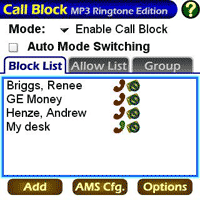
Upon opening Call Block (CB from here on in), you’re presented with a fairly user-friendly main screen. There's the omnipresent title bar and Help icons along the top of the screen, which will display various configuration options and, strangely enough, help. Below, a drop-down box lets you set CB to 'Enabled', 'Disabled', or 'Block All (except Allow)'. The latter option is quite useful when you want to be accessible only to the people you actually care about, rather than the ones you pretend to.
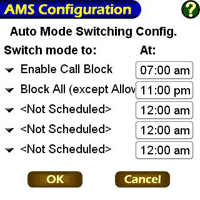
Next, there's a checkbox that will allow you to toggle the Automatic Mode Switching. AMS lets you set a specific schedule for CB's various filters; for instance, you can choose to screen family or friends out during business hours, or you can set it to block your workaholic boss outside those hours. These options are set via the title bar menus.
A simple tabbed interface lets you switch between your Block, Allow and Group lists, which are self-explanatory. The Group lists are quite handy; here you'll be able to filter out entire categories of contacts, anyone who is not in your Contacts, and private (no Caller ID) numbers. Thoughtfully, the Group box is already pre-filled with the various categories; you just need to turn them on or off as you please, rather than adding each individual category yourself. Adding a number to the Block or Allow lists is as easy as tapping the "Add" button at the bottom of the screen and entering the details. (You can also lookup numbers directly from Contacts.)
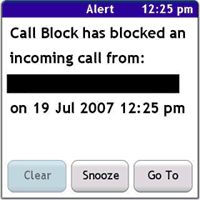
 There are three different categories you can set for your filters: 'Always Allow', 'Block permanently', or 'Block if mode is Block All'. CB indicates this status on the main screen with a simple green tick or red cross icon. When a call is blocked, CB will notify you via a standard Alert (see screenshot). Deliciously, CB gives you two choices for ignoring calls: you can either just hang up and send them to voicemail, or use the evil Pickup+Hangup option, which not only sends a potent message of disdain but also ensures that your annoyer is charged for the privelige of being hung up on by you. It's the phone etiquette equivalent of a raised middle finger. Needless to say, I love it, and so should you.
You can still choose to receive SMS messages from people whom you've blocked calls from. You can also choose to deactivate the SMS alert if the message is from a particular contact, or to simply delete any message that comes through from them. This is especially handy if, like me, your telco loves nothing better than to send you incredibly irritating texts advertising their latest ear-rending pop ringtones – for the incredibly low low price of a virgin sacrifice! (Actually, that's a joke: Optus is not that generous.) Into the bin!
If there's one criticism to be made, it's that CB uses a coloured handset icon to indicate which blocking method you're using with a particular filter, and when it's set to Pickup+Hangup it's a murky half-red, half-green. My eyes had a lot of trouble distinguishing between the dual-coloured and mono-coloured icons. But it should say a lot for CB that that was the worst criticism I could come up; it's easy to navigate and is rock-solid stable. Two thumbs up.
Annoy the Public
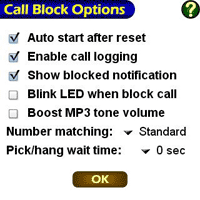
This latest version of Call Block also sports an extra feature: mp3 ringtone support. Palm, in their infinite wisdom, have never supported this – even on their unlocked Treos, and even though they ship with an mp3 program as standard. CB allows you to set mp3 ringtones for particular groups, or the people on your Allow list. In order to choose an mp3 you'll be presented with a simple SD file browser that is sufficient, but a chore to navigate if you have a lot of files to get through. A 'find-as-you-type' feature, or even a simple alphabetical skip with the keyboard would be a smart addition in future versions.
Unfortunately for me, the mp3 ringtones were somewhat unreliable. It chokes on variable-bitrate files, which is a major problem for me because of lot of the music in my library is ripped at a VBR. Be sure to test out the tone by having someone call you first (or calling yourself if you have no friends). CBR-encoded files should cause no problems.
Miscellaneous fluff
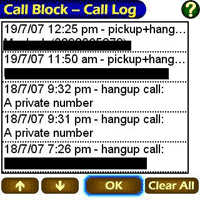
There are a few other things worthy of note. In addition to the standard alert it pops up when a call is blocked, CB also keeps a log of all filtered calls, so if you choose to turn the alerts off you can still see what's been blocked and what hasn't. CB also has a Soft Reset option on the menu which - as most Palm users know by bitter experience – is very handy to have, especially now that they've removed the reset button.
We the jury find the defendant...
So, worth $14.95? You betcha. That's even cheaper than getting a slave to answer your phone for you, if you factor in the gruel and housing costs. The mp3 support could use a little work, and the interface isn't incredibly beautiful, but it's perfectly stable and is highly configurable. Exemplary program. 9/10.
Call Block MP3 Ringtone Edition for Palm OS from WISH Solutions is available for $14.95 USD and comes with a free trial period.
Editors note:
Tim uses PalmRevolt with the excellent Cobalt 6.0b skin and Fontsmoother with a Arial 14pt font to achieve the custom look seen in some of the screenshots above.
 Permalink
 Print
PrintArticle Comments
(8 comments)
The following comments are owned by whoever posted them. PalmInfocenter is not responsible for them in any way.
Please Login or register here to add your comments.



Nice article.

"..(or calling yourself if you have no friends)."
hehehe
Sounds like a useful product. I will look into it.
By the way, little typo in the article:
"as most Palm users knows by bitter experience" should be
"as most Palm users know by bitter experience"
Oh my God, Voldemort WINS!!
Ahem. Just had to get that out.
Thanks Vampy. I'm always noticing little typos and mistakes after I hand these things in. I usually leave them as they are so as not to drive Ryan completely insane with edit requests. Think of them as flawed masterpieces. Like The Order of the Phoenix. Now there's a text that could have stood a little editing...
Comparison to Buzz (Toysoft)
USR Pilot5000 > 3Com PalmPilot Pro > Palm IIIx > Palm 515 > Palm TT3 > Palm Treo 700p
RE: Comparison to Buzz (Toysoft)
So, if Buzz does the same sort of stuff and doesn't crash your Treo, then it's probably just as good. Except, of course, Call Block is $5 cheaper. ;)
Tim
I apologise for any and all emoticons that appear in my posts. You may shoot them on sight.
Treo 270 ---> Treo 650 ---> Crimson Treo 680
RE: Comparison to Buzz (Toysoft)
Lightwav Features
-----------------
-Includes MP3/WAV/OGG player. No need for 3rd party audio player
-Repeat individual ringtone specifying duration in seconds to repeat
-Set song position to start playing as the ringtone
-Full screen JPG caller ID. Only possible with Lightwav
-GIF and GIF Animation as caller ID
-Live! video caller ID. Required Live www.toysoft.ca/live650.html to record high resolution videos
-Classic and Picture Dial views
-Set custom MP3 ringtones for sms and voicemail notifications
-Assign custom wav/mp3/ogg ringtone to Contact and Categories
-CallerID and SMS blocking. Block unwanted callers and SMS
-North America area code. See where the caller is calling from
-Convert sound files from card to RAM.
-Do not disturb feature. Send friendly SMS message when you are busying or away from the phone or forward the call when DND is active.
-Block any caller or callers not in your Contact database
-VIP feature. Allow VIPs to call you regardless if Do Not Disturb is enabled
-Call notes. Add a journal for the caller into the Calendar application
-Ringtone volume boosting. Ringtone not loud enough. No problem with Lightwav
-Option to always Send SMS to mobile number if exists. No matter it the caller called from Landline
-Announce incoming call. Many different languages
-Send friendly SMS message for missed calls
-Pager. Use Lightwav as a traditional pager for incoming SMS and Missed Calls
-Simple yet powerful Profile Manager. Take control of your Treo.
-Calendar/Agendus/Datebk6 profile integration
-MP3 ringtone safe mode in case the external card becomes ejected
-2Day integration. See all blocked and missed calls on 2Day screen
Callfilter?
RE: Callfilter?
Call Block
* Much more stable than Callfilter, which crashed my 650 constantly. I'm not sure if that was the 650's fault or Callfilter's, though. I reviewed Call Block on the 680.
* Better, more user-friendly interface (although this is subjective)
* Compatible with more Treos (650, 680, 700p, 755p, although I can't make any claims about stability on anything but the 680.)
* Cheaper than Callfilter ($14.95 vs $29.95)
Call Filter
* Heaps more features than Call Block (call completion screens, SMS scripting, speaks incoming phone numbers etc)
* Integrates with some Treo profile apps for quick filter switches
* More configurable than Call Block
* Hasn't been updated since 2005, I think - only officially compatible with the Treo 600 and 650.
In the end, I'd pick Call Block over Callfilter, simply 'cause Callfilter was too unreliable for me. But as they say, your mileage may vary. Both apps have free trials.
Tim
I apologise for any and all emoticons that appear in my posts. You may shoot them on sight.
Treo 270 ---> Treo 650 ---> Crimson Treo 680


Latest Comments
- I got one -Tuckermaclain
- RE: Don't we have this already? -Tuckermaclain
- RE: Palm brand will return in 2018, with devices built by TCL -richf
- RE: Palm brand will return in 2018, with devices built by TCL -dmitrygr
- Palm phone on HDblog -palmato
- Palm PVG100 -hgoldner
- RE: Like Deja Vu -PacManFoo
- Like Deja Vu -T_W


tested on