


TCL Labtec Stereo Headset Review
By: Kris KeilhackApril 11, 2007
Conventional Palm PDAs have incorporated a 3.5mm stereo headphone jack ever since the days of the Tungsten T in 2002. Yet Palm’s Treo line has soldered along unchanged with its 2.5mm headset plug dating back to the earliest days of the Treo 180. Treo users desiring high-quality stereo sound are still saddled with using a bulky 2.5mm to 3.5mm headphone adapter or buying pricey, often underwhelming stereo headphone/microphone combo units.
In addition to being inconvenient, the Treo’s 2.5mm plug is also very fragile. Treo message boards and forums are inundated with reports of flaky headset jacks and loose connectors. Since Bluetooth A2DP functionality is present only on the Treo 750 and via a Softick Audio Gateway on Palm OS, Palm OS Treo owners have really been left out in the cold audio-wise in comparison to Palm handheld users or even the cheapest mp3 players on the market. As always, Tech Center Labs A.K.A. TaleStuff have emerged from out of nowhere with another elegant solution for frustrated Palm users everywhere! The TCL product up for review today is a reengineered Labtec stereo headset with an integrated boom microphone.
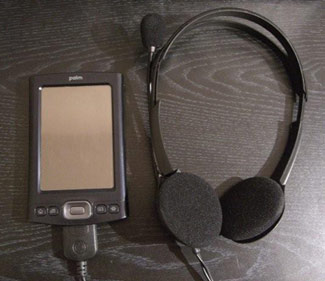 In the Box
Being a small operation, TCL doesn’t bother with fancy packaging and focuses their resources on the products. The headset shipped in an oversized, padded, non-descript USPS mailer box. No complaints here.
Overview
TCL has modified the original Labtec design to include a Palm MultiConnector (“Athena”) connector. While not widely publicized, the Palm MultiConnector standard does include audio output functionality. This feature has mostly gone unnoticed and unutilized in all but a handful of accessory cradles and speaker docks such as Palm’s own T5/TX/LD/E2 cradle kit and products like the Altec Lansing IMT1 speaker system and the Brando Music Dock.
In short, owners of all Palm MultiConnector-enabled devices (other than the E2—see compatibility notes below) can have a set of decent stereo headphones connected via the Multiconnector port. Additionally, Palm TX and T5 owners can have both stereo headphones and a high-quality microphone in the same package. Please note that this is an aftermarket modification and is unsupported and unwarranted by Labtec/Logitech. Of course, it’s still much less risky than trying to hardmod a microphone into a TX/T5 case or resolder a loose Treo headset port onto the motherboard!
Initial Impressions & Build Quality
Keeping in mind its intended price point and mass-market audience, the TCL headset is of high quality indeed. By virtue of originally being a Labtec Axis 202 headset intended for the PC add-on market, TCL can take advantage of the economies of scale and high OEM quality befitting a large company like Logitech (Labtec is a lower-priced devision of PC peripheral giant Logitech) in ways otherwise unattainable.
The actual headphones are lightweight black plastic with standard thin foam padding over the drivers. Two small Labtec logos are printed on the side of the body. The headphone bands are adjustable for different head sizes and the microphone can be swiveled around to face the right or left sides of the users’ mouth. The cable is a bit on the short side (~36”) but still usable. I had no problems dropping my Treo into a pants pocket while jamming to my tunes. It is also well-insulated so no “bumps” transmit through while in motion.
I’ve used plenty of Logitech-branded peripherals (and a few from Labtec) over the years, so I was unsurprised to see decent styling and good quality plastics used in the construction of the headset. This product is something you’d easily pay $20 for at a retail store like Best Buy or CompUSA for casual Skype usage on a PC.
My only concern going into the review period was where TCL had replaced the original 3.5mm stereo headphone + microphone plugs with a single Palm MultiConnector plug. I was relieved to find the cable looked completely factory-perfect. There is simply no evidence of anything appearing modified. In no way does this headset appear “homemade” or having anything less than perfect OEM quality. Color me extremely impressed with TCL’s job on this one!
Installation on my TX was absolutely flawless. Testing the ‘phones with Pocket Tunes did not give me any problems whatsoever. Even inserting and removing the ‘phones during playback did not cause my TX to hiccup or crash. TCL does caution that it is advisable to insert the MC plug after starting PTunes, just to make sure the device recognizes them properly.
I did have some issues with getting proper audio output at times with my 700p. I never did figure out if this was due to the fact that I might have a flaky set of headphones or if my 700p has some small issue with its MultiConnector port. A reset and/or gentle wiggling of the headphones’ MC plug usually cured the problem right away.
Sound Quality
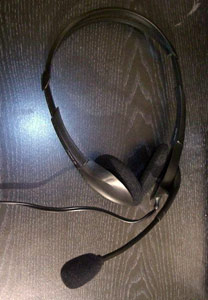 Sound Quality, while nothing to write home about in comparison to my everyday stereo earphones (Shure E3c), was surprisingly decent. Offhand, I’d rate the sound quality from these Labtecs about one notch better than the similarly sized on-ear Sony headphones included with the last CD Walkman I purchased. Bass response was thin but still listenable and the stereo separation was good. I’ll gladly trade off some sound quality just so I don’t have to carry around an easily lost stereo headphone 3.5mm adapter or risk damaging my Treo’s headset plug.
Testing the unit with my Palm TX for audio capture revealed a few very pleasant surprises. I recorded dictation at a normal speaking volume into the headset during a normal workday. I used my standard recording app (the freeware SoundRec) with a reasonable amount of background ambient noise. I also took several recordings walking around outside with a mild breeze blowing. The Labtec’s boom microphone produced, clearer, crisper sounding recordings on my TX than the TCL bud microphone reviewed previously, my old T3’s integrated microphone or even my 700p’s microphone under similar test conditions! Without going into too much detail here, there’s a blurb on the TCL page about the special NCAT noise-reduction technology used by the Labtec mic. Whether marketing hype or not, the mic produces high-quality recordings. I’m no audio engineer, but I imagine this would be the ideal companion for a Palm TX/T5 user looking to transcribe lengthy audio memos, dictations, or field recordings.
Compatibility & Availability
According to Gary at TCL and verified with my own testing on my 700p, the Labtec microphone does not work on any Palm device with an integrated mic. So LifeDrive and Treo users are out of luck but Palm TX and T5 owners can rejoice. Do note that the older, budget-oriented Tungsten E2 unfortunately does not have the proper pinouts on its MultiConnector for audio input or output.
Stereo Output: Palm Tungsten T5, TX, LifeDrive, Treo 650, Treo 680, Treo 700p, Treo 700w/wx, Treo 750. Tungsten E2 unsupported
Stereo Output + Mic In: Palm TX & Tungsten T5
Conclusion
While not the perfect solution for every users’ needs, this is a totally unique product in the Palm accessory marketplace.
Obviously, Palm TX and T5 handheld users will realize the biggest benefits from this device, as it not only gives them a very high-quality microphone for their devices but also a pair of decent stereo headphones to boot! Of course, TX owners (like myself) who already have a decent pair of headphones or earbuds should just purchase the TCL bud mic and be done with it. But the convenience and comfort factor of wearing a pair of lightweight headphones with an integrated boom mic is hard to beat for a user with serious mobile audio capture requirements.
Even disregarding the fact that the microphone is useless to Treo owners, this is an affordably priced solution for Treo owners not wanting to risk damaging their fragile headset jacks…or for gaining stereo headphone sound from a Treo that might already have a damaged port. Since this is a relatively unique, limited production item, quantities are limited to just a few hundred units remaining. While nothing is certain, if enough users kindly request it, TCL might even consider modifying a batch of compact stereo headphones specifically for Treo users. So until Palm comes to their collective senses and incorporates a standard stereo headphone jack with their Treos (like every Walkman produced since 1979) I’ll continue to keep this nifty TCL product in my desk drawer.
The Labtec Stereo Headset with Boom Mic is available now for $19.95 + shipping from TaleStuff.
Pros:
- Lightweight, comfortable design for a pair of budget headphones. Stylish, too!
- Reasonably sound quality for casual music playback
- Boom mic is adjustable for left and right side usage
- Mic has superb sound capture quality considering the product’s price
Cons:
- A bit bulky and fragile for travel purposes
- Treo sometimes requires a reset to recognize the presence of the headphones and mute the internal speaker
- Only limited quantities available!
My Rating:  4.5 / 5
 Permalink
 Print
PrintArticle Comments
(2 comments)
The following comments are owned by whoever posted them. PalmInfocenter is not responsible for them in any way.
Please Login or register here to add your comments.



Two Questions About

Could you please tell me what software your were using to capture audio on your TX?
I'm also very curious if the headphone jack in the TX is disabled while the TLC Labtec Stereo Headset is in use - or can they both be used simeltaneously?
Of course, this would permit two people to listen in at the same time - but this can also easily be accomplished with a Y- adapter). However, my real goal is to use the headphone jack in the TX for connecting an FM transmitter while the Labtech headphone mic is in use in the multi-connector. This would enable inexpensive amplified broadcasting of my voice and would have a variety of applications - from speaking at public events to attending demonstrations.
Probably the most useful for me would be telling or reading stories to my kids on long trips in our minivan. I typically sequester them to the back seat to give my wife and I some peace and quiet. But then It's hard to speak to them comfortably.
The other reason I'm interested in TCL's Stereo Headset Microphone is because I'm thinking about getting VoiceIt Technologies two products: VoiceNaveIt and VoicePlayIt to create and use a variety of dictation command shortcuts to various functions on my TX.


Latest Comments
- I got one -Tuckermaclain
- RE: Don't we have this already? -Tuckermaclain
- RE: Palm brand will return in 2018, with devices built by TCL -richf
- RE: Palm brand will return in 2018, with devices built by TCL -dmitrygr
- Palm phone on HDblog -palmato
- Palm PVG100 -hgoldner
- RE: Like Deja Vu -PacManFoo
- Like Deja Vu -T_W


Thanks!
On another subject, if you remember in the TCL review we posted, I mentioned that I hoped to see Jeff's htm type software running on a Palm, I knew it wasn't going to happen so I wrote a simulation.
http://home.earthlink.net/~gmayhak/M5_htm.htm
Intelligent Treos ???
it's a free download.
Gary
Tech Center Labs
www.talestuff.com